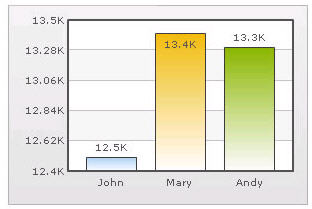
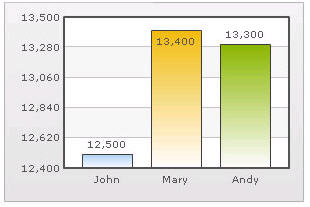
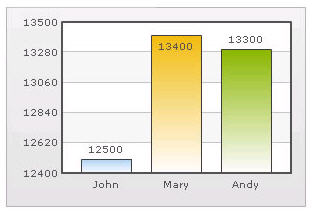
Automatic Number Formatting qChartView automatically formats your numbers by adding K,M (Kilo, Million) and proper commas to the numbers, as shown in this example: Figure 20. Automatic Number Formatting The data for chart is 12500, 13400 and 13300. qChartView automatically formats the number scaling to convert to K (Thousands) & M (Millions). If you do not want to truncate numbers 1 From Chart Attributes, click Edit. 2 Click Number Formatting. 3 From Format Number Scale, select False. 4 Click Save. When you now view the chart, you will see the following: Figure 21. Not truncating numbers In the example above, qChartView is showing full numbers on the chart. It has also added commas to the numbers at the required places. If you do not want to set commas 1 From Chart Attributes, click Edit. 2 Click Number Formatting. 3 From Format Number, select False. 4 From Format Number Scale, select False. 5 Click Save. Figure 22. Not setting commas The commas have been removed from numbers.