qChartView : qChartView Pages : Content Page : Primary Content

Primary Content
The Primary Content page is default category. You need to configure one or more elements in this page to get started using this web part.
Primary Content contains the following:
 
See Viewed Lists for more information
See Configuration for more information.
See Drill Chart Configuration for more information.
Viewed Lists
This property defines the lists whose data is aggregated in the Chart View.
The following are the elements for the Viewed Lists attribute.
 
Table 2. Viewed Lists
Configuration
This property defines how the data should be grouped in the X Axis and the data series for the chart.
The Configuration element should contain only one X-Axis and one Series element. Each Series element may contain one or more Items element.
The Configuration section contains the following:
;
 
Table 3. Configuration
If you want to add a data series, configure the following:
 
Table 4. Data Series
Examples of Configuration Property
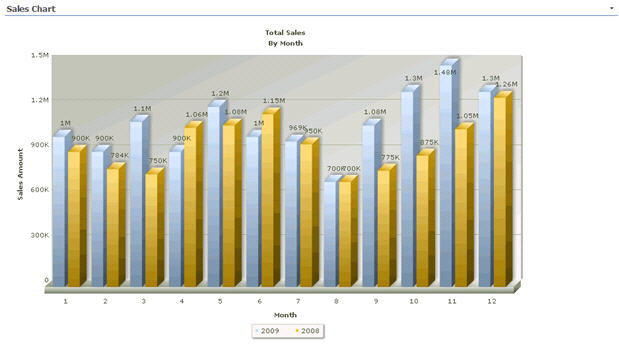
The following is an example of the Configuration property if you want to display data from your Sales list. Your Sales list contains the sales amount for every month in the year. There are 3 fields in the list: Year, Month, and Amount. For example, say you want to display the month in the X axis. You also wants to create the data series dynamically based on the year field.
If you are using Advanced Mode, here is the XML:
<Configuration>
    <Series>
     <Items FieldName="Amount" AggregateFunction="Sum" ChartSeriesType="COLUMN" FilterFieldName="Year" />
;
    </Series>
    <XAxis FieldName="Month" SortFieldName="Month" />
</Configuration>
The following shows the resulting chart
Figure 1. Example of Configuration Property chart
 
Drill Chart Configuration
The Drill Chart Configuration property allows you to create different types of drill down charts namely: In-place Chart and Link Chart.
In-place Chart
The Drill Chart Configuration property for an In-place Chart defines how the data should be grouped in the X Axis and the data series for the drill down chart you want to design. A drill down chart involves moving to another chart (child chart) when the original data plot (parent chart) is clicked. Each subsequent drill down chart level can be configured as a child of the previous level (parent) in a continuous parent-child relationship. You can define nth level of drill down charts using a single data source.
Table 7. Data Series
Table 9. Data Series